
Explainer written by Kaveh Dianati, System Dynamics Modeler, and Janet Chikofsky, Project Manager
This article gives an overview of energy subsidies and taxes in the En-ROADS Simulator. Watch the video below for a summary.
Governments around the world both tax and subsidize energy, shaping the cost of energy in ways that are not always obvious. The scale of these interventions is substantial. Globally, fossil fuel subsidies have averaged on the order of $700–800 billion per year over the past decade (IISD & OECD, 2024). At the same time, governments also collect significant revenues from energy taxes (particularly on oil), meaning that the overall policy landscape is a complex mix of incentives and disincentives across different fuels.
En-ROADS allows users to explore this landscape by adjusting taxes and subsidies separately for each major energy source, starting from a baseline that reflects today’s real-world policy environment. This makes it possible to test a wide range of “what-if” questions, such as:
- What if we phased out fossil fuel subsidies?
- What if we reallocated those subsidies to clean energy?
- How does taxing different fossil fuels compare in terms of their climate, environmental, and fiscal impacts?
Similar questions are actively debated in policy circles. For example, countries at the COP28 UN Climate Change Conference agreed to “phase out inefficient fossil fuel subsidies,” reiterating a long-standing international commitment (UNFCCC, 2023). Similarly, organizations such as the International Monetary Fund and the International Energy Agency have repeatedly called for subsidy reform and for redirecting public support toward low-carbon energy (IMF, 2025; IEA, 2023).
How are energy taxes and subsidies represented in En-ROADS?
The En-ROADS Baseline Scenario includes existing energy taxes and subsidies and assumes that they continue. The default values of the energy supply sliders (e.g., Coal, Oil, Natural Gas, Bioenergy, Nuclear, and Renewables) reflect these existing taxes and subsidies. These sliders represent explicit policies that directly raise or lower the cost of energy. This includes subsidies such as grants, tax breaks, and price controls; and taxes including those on diesel and gasoline that often help pay for roads. The default values exclude harder-to-quantify support like underpriced environmental and health damages (often called “implicit subsidies”) or public infrastructure funding, and carbon pricing (handled separately via its own dedicated slider).
Default values are approximate global averages drawn from datasets such as the Fossil Fuel Subsidy Tracker (a joint initiative by the OECD and International Institute for Sustainable Development) and IRENA, and therefore carry uncertainty. Most energy sources are net subsidized, but oil is a notable exception, where fuel taxes outweigh subsidies, resulting in a net tax in the model.
To learn how we have estimated default “status quo” values for current energy supply tax and subsidy levels, please see the En-ROADS Technical Reference.
How do the energy sliders work?
At a high level, the energy sliders change the price of energy delivered to consumers. Subsidies lower prices and make an energy source more attractive; taxes raise prices and discourage its use. These price changes then ripple through the energy system via supply and demand, as well as dynamics such as “squeezing the balloon” (e.g., taxing one energy source, such as coal, will make another, such as natural gas, more attractive).
Each energy source has a main “price adjustment” slider that combines the effect of taxes and subsidies into a single value. A negative number indicates a net subsidy and a positive number indicates a net tax. For example, setting the "Coal price adjustment" slider to -20% means the price of coal is reduced by 20% (a net subsidy), while +20% means the price is increased by 20% (a net tax), relative to its price at the mine.

Reducing coal net subsidy to 20% using the main slider
The caption below each slider offers a plain-language description: moving the slider to the right encourages use of the energy source, while moving it to the left makes it less encouraged (if it starts out subsidized) or discourages it further (if it’s already being taxed). (If you're using En-ROADS in a right-to-left language such as Arabic or Farsi, the left and right directions are reversed.) At 0%, the energy source is either not being taxed or subsidized, or the taxes and subsidies offset each other so that the net effect is zero.
Alternatively, you can toggle "Use detailed settings" to adjust taxes and subsidies separately:
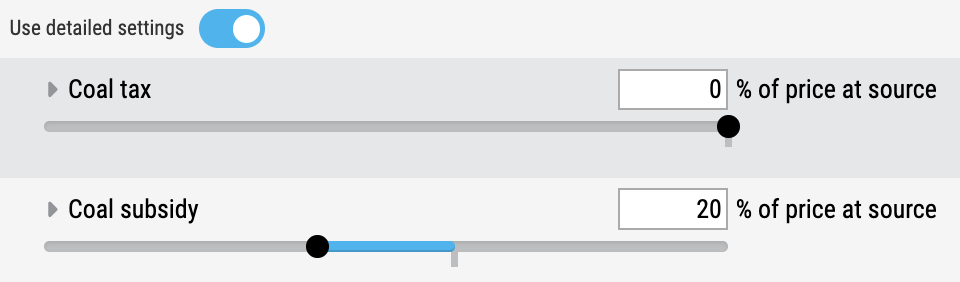
Reducing coal subsidy to 20%, using the detailed settings
A 30% subsidy combined with a 10% tax would also result in coal being net subsidized by 20%. Think of this as subtracting the subsidy (bottom number) from the tax (top number) to get the net effect on the price at source.
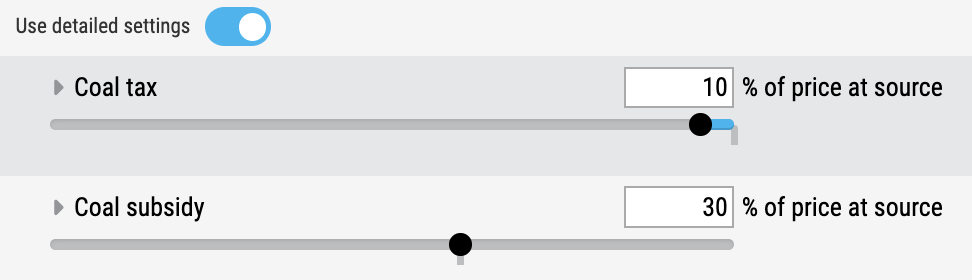
Alternative method to reduce coal net subsidy to 20% using the detailed settings
Instead of expressing taxes and subsidies in dollars per unit of energy, sliders for all fuels are expressed as a percentage of price of the fuel at source, which includes production costs and the producer's profit margin. This allows comparability across very different energy sources.
Fossil fuels and bioenergy
For coal, oil, gas, and bioenergy, the sliders are defined as a percentage of the price at the source (e.g., price of coal at the mine).
For example, a 15% net tax on oil means the effective price of oil is increased by 15% relative to its production cost. This is equivalent to about $9 per barrel in 2021 US dollars, calculated as a global average.
To see what each tax or subsidy means in familiar units like $/ton or $/barrel, view the price graphs under Graphs > Financial, e.g. “Price of Oil.”
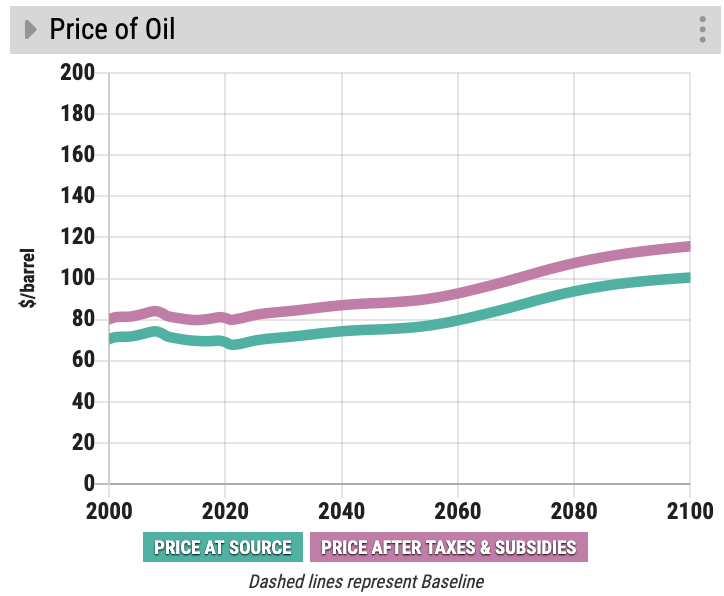
The pink line in the price graphs (“Price after taxes & subsidies”) reflects the direct impact of your slider changes. This line represents the “Price at source” plus taxes and subsidies. Increasing a tax pushes this line up; increasing a subsidy pulls it down.
The green line (“Price at source”) can also shift slightly as a result of your slider changes. This happens because changing prices affects supply and demand in the energy market, which in turn feeds back into production costs. For example, increasing the tax on oil, which increases consumer prices, is likely to temporarily reduce its price at source due to dampened demand.
Renewables and nuclear
For electricity, there is no clear analogue to “price at source,” unlike for fuels which are globally traded commodities. Therefore, for renewable and nuclear energy, the sliders are defined as a percentage of the levelized cost of energy (LCOE). LCOE reflects the average cost of generating electricity over a plant’s lifetime and is the closest consistent, technology-neutral proxy for the underlying cost of supplying electricity.
For example, a 30% subsidy for nuclear means the effective cost of generating nuclear electricity is reduced by 30% relative to its LCOE.
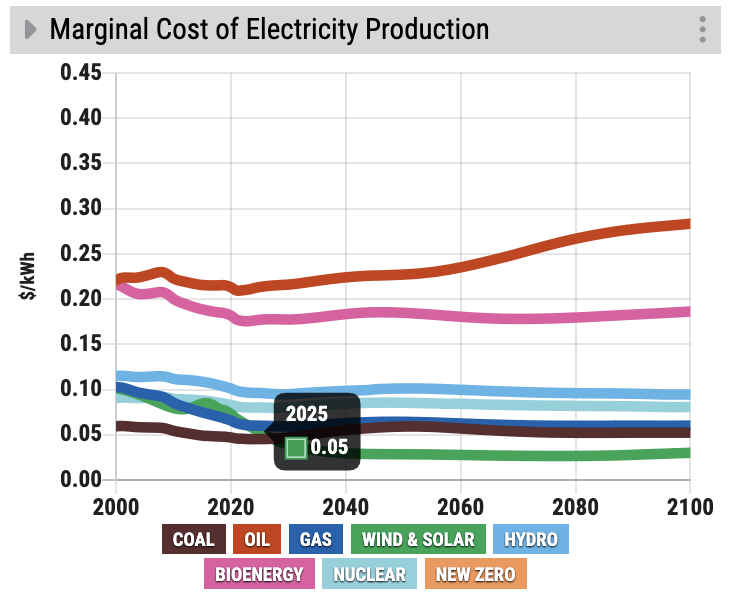
To see what each tax or subsidy means in $/kWh of electricity generated, view the “Marginal Cost of Electricity Production” graph.
How do I use these features in workshops?
The tax and subsidy sliders open up several useful workshop conversations. Below are four practical ways to use them, along with what to look for and how to guide the discussion.
1. Test removing all fossil fuel subsidies
This is a good complement to boosting renewables—as long as fossil fuels remain cheap, demand for them stays high, which slows the clean energy transition.
Under “Use detailed settings” for each fuel, set the subsidy sliders for coal, oil, and natural gas to zero to simulate removing all fossil fuel subsidies. See scenario here.
Then observe what happens to CO₂ emissions, temperature, air pollution, price of energy to consumers, and government revenue.
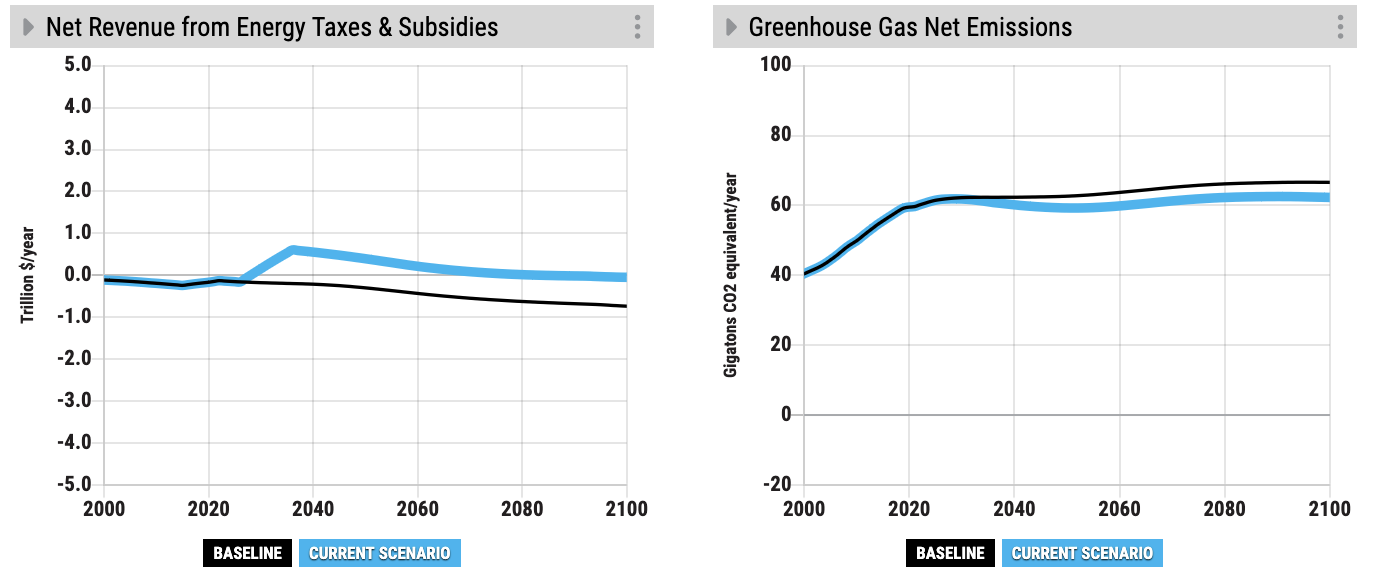
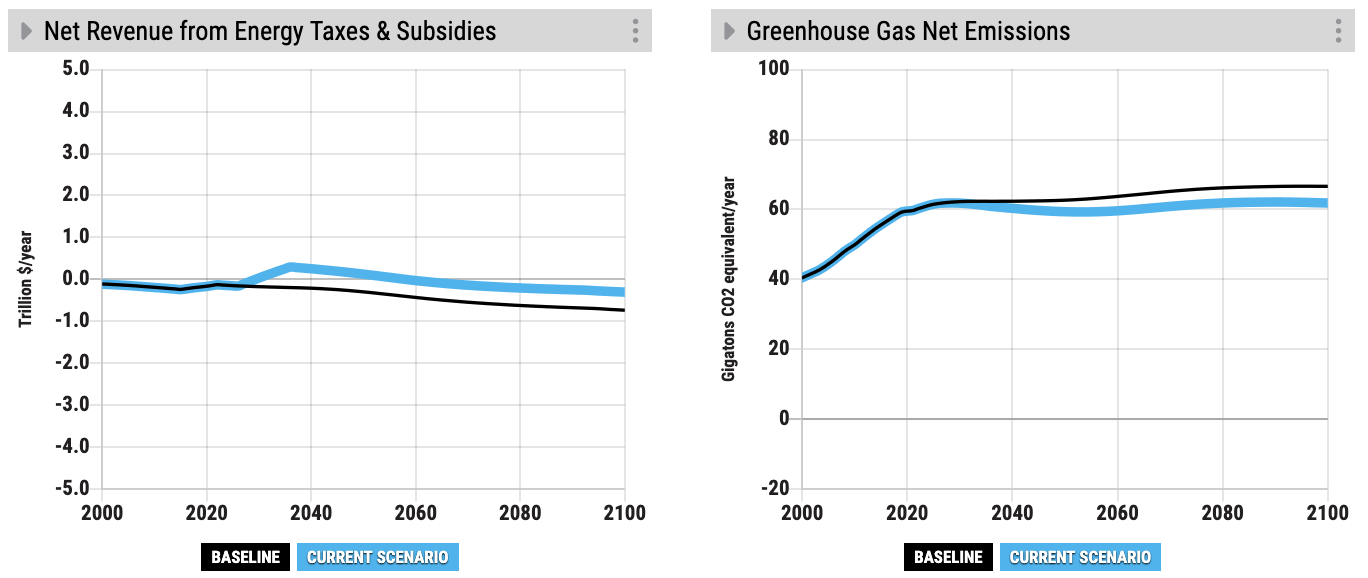
A useful talking point here is that the emissions and temperature effect of removing all fossil fuel subsidies is similar to introducing a moderate carbon price of $19/ton CO₂, about four times the current global average carbon price. From a policy perspective, removing fossil fuel subsidies can be easier to discuss, since it involves removing existing support for polluting sources rather than introducing a new, visible tax. Notice this similarity by comparing greenhouse gas net emissions in 2050 and 2100 in the removing-fossil-fuel-subsidies scenario to the $19/ton-carbon-price scenario:
Removing fossil fuel subsidies:
$19/ton carbon price:
Suggested graphs:
- Greenhouse Gas Net Emissions
- Temperature
- Air Pollution from Energy
- Net Revenue from Energy Taxes & Subsidies
- Average Price of Energy to Consumers
2. Try redirecting fossil fuel subsidies to renewables
Explore what happens when energy subsidies are shifted rather than eliminated.
First, remove fossil fuel subsidies as in the previous scenario. Then increase subsidies for renewables to a level that is roughly equivalent to the net revenue saved by removing fossil fuel subsidies in a given year, such as 2050.
To do this, show the “Net Revenue from Energy Taxes & Subsidies” graph and start slowly increasing the “Renewables price adjustment” (main) slider until the blue (Current Scenario) curve in the graph crosses the black (Baseline) curve in 2050. This should occur at a level of about -80% (of levelized cost) price adjustment for renewables. See the scenario here.
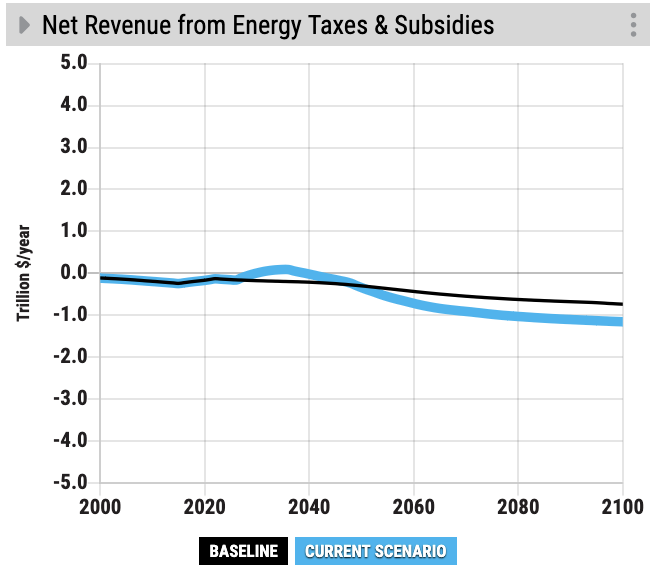
Focus on changes in temperature and emissions, co-benefits such as air quality improvements, and the net effect on government revenue.
Suggested graphs:
- Greenhouse Gas Net Emissions
- Temperature
- Air Pollution from Energy
- Net Revenue from Energy Taxes & Subsidies
3. Compare individual energy sources
Move one slider at a time to compare the environmental, climate, and economic impacts of encouraging or discouraging different fuels.
For example:
1. Taxing oil to the maximum allowed in the simulator (200%) alone has a tremendous impact on financial indicators such as “Net Revenue from Energy Taxes & Subsidies,” “Fossil Fuel Revenues” and “Average Price of Energy to Consumers.” The “Fossil Fuel Revenues” graph highlights what is at stake for governments and industries tied to fossil fuels. Oil is an expensive fuel with strong demand in transport, where alternatives are limited and users are willing to pay more for its energy density and convenience. This same lack of alternatives means that the impact of taxing oil on emissions is likely to be relatively modest compared to coal.
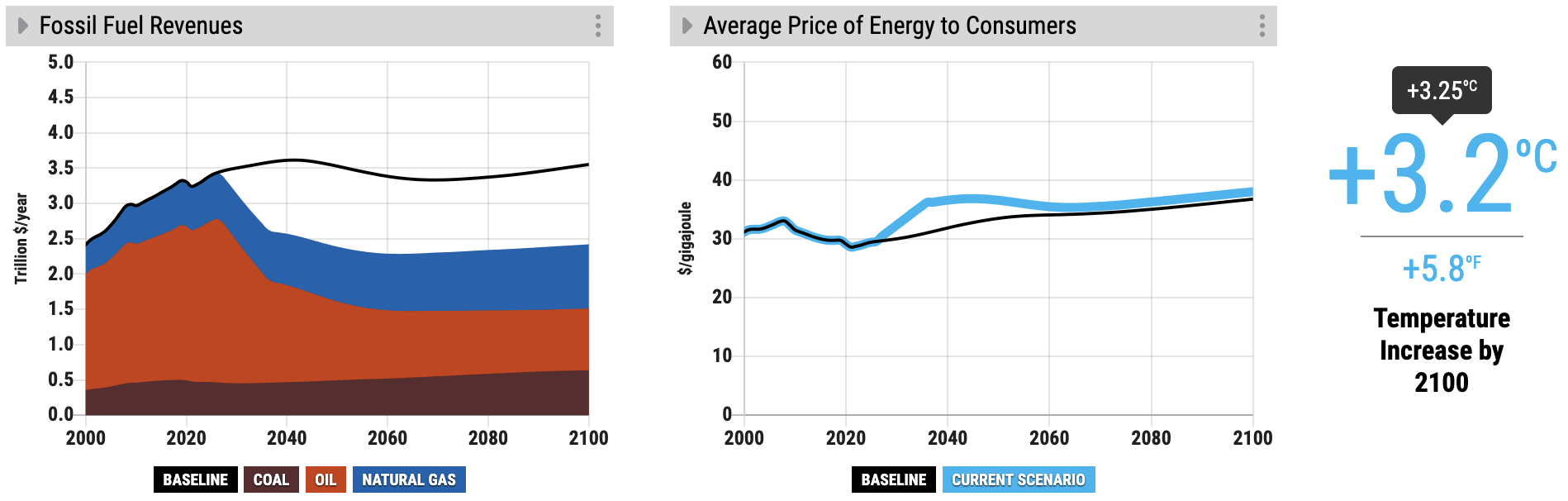
Taxing oil to the maximum (200%)
2. Taxing coal, on the other hand, has the largest effect on temperature and air pollution of any of the energy sources. Coal is primarily used in power generation, where cheap renewable alternatives already exist. It is also the most carbon-intensive and the most polluting among the fossil fuels. On the other hand, coal is relatively inexpensive per unit of energy, and therefore the economic disruption of taxing it is likely to be relatively modest when compared to oil and gas.
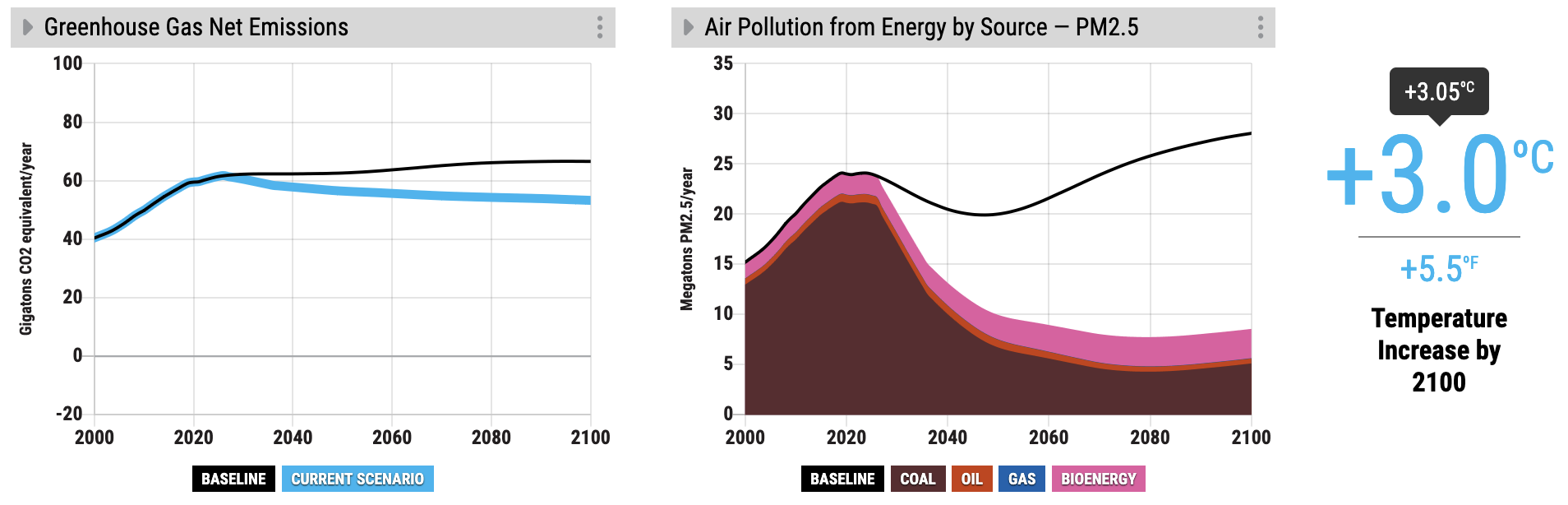
Taxing coal to the maximum (200%)
Suggested graphs:
- Temperature
- Air Pollution from Energy
- Average Price of Energy to Consumers
- Fossil Fuel Revenues
- Energy Supply Subsidies